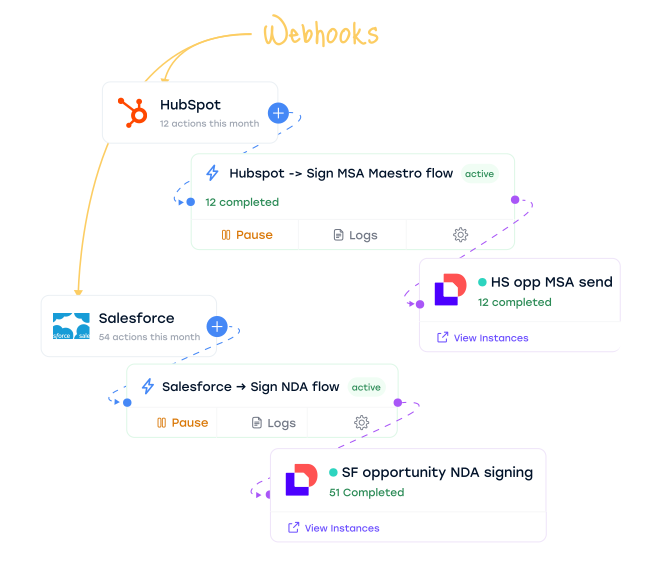
Workflow Builder runs the workflow. Baton starts it from any webhook.
Docusign Workflow Builder handles the orchestration. Baton extends it - connecting your business platforms, automating how workflows get started, and giving you a visual command center to manage everything in one place.
Start workflows from any platform event
Workflow Builder can start from web forms, envelopes, API calls and the start actions Docusign publishes for platforms such as Salesforce Flow, ServiceNow and Power Automate. Baton adds webhook starts for platforms that only send webhooks, such as Procore and Xero, with monitoring for every start. When a deal closes or a subcontractor is approved, the right workflow starts automatically with the right context.
See everything in one visual dashboard
Baton gives you a single view across all your platforms and Workflows - which automations are active, how many have triggered, success rates, and where errors are. Platforms on the left, automation rules in the middle, Workflows on the right. Everything at a glance.
Set up, test, monitor, and fix - all in one place
Baton makes it easy for your team to adopt Workflow Builder automations at scale. Connect a platform, configure the automation, test it, and go live - all from one interface. When something needs attention, Baton shows you exactly what happened and helps you resolve it fast.
Connect. Configure. Automate.
Baton receives webhook events from your platforms, extracts the relevant object ID, and fires a Workflow Builder API launch request. Your Workflow handles the rest.
Events fire
Business platforms send events. Baton listens.

Opportunity stage → Closed Won

Ticket is created

Invoice created

New hire onboarding

Baton Engine
Workflow Builder fires
Workflows run. Agreements get signed.
3 signers → Salesforce sync
IT desk review → eSign → ServiceNow update
Approve → eSign → Xero payment
HR review → eSign → BambooHR
Connect your platforms. Give Workflow Builder context.
Baton connects your business platforms to Workflow Builder through webhooks. When something happens in your system - a deal closes, a hire is made, a subcontract is approved - Baton makes sure the right Workflow Builder workflow starts with the right data, so it knows exactly what to work with.
 LIVE
LIVESalesforce
Sales & CRM
Opportunity closed-won, contract signed, or account events fire webhooks. Baton extracts the opportunity or contact ID so Workflow Builder can read the deal context and generate the right contract.
 LIVE
LIVEHubSpot
Sales & CRM
Opportunity closed-won, contract signed, or account events fire webhooks. Baton extracts the opportunity or contact ID so Workflow Builder can read the deal context and generate the right contract.
 LIVE
LIVEZoho CRM
Sales & CRM
Deal-to-agreement automation. When a deal moves to closed-won, Baton triggers the right Workflow with all deal data pre-populated.
 LIVE
LIVEPipedrive
Sales & CRM
Deal-to-agreement automation. When a deal moves to closed-won, Baton triggers the right Workflow with all deal data pre-populated.
 IN DEVELOPMENT
BambooHR
HR Management
Employee onboarding workflows - offer letters, NDAs, benefits enrollment. New hire in BambooHR triggers the full document package through Workflow Builder.
 ON REQUEST
Other webhook sources
All platforms
Any platform that can send a webhook can be added as a Baton source on request.
LIVESalesforce
Sales & CRM
Opportunity closed-won, contract signed, or account events fire webhooks. Baton extracts the opportunity or contact ID so Workflow Builder can read the deal context and generate the right contract.
LIVEHubSpot
Sales & CRM
Opportunity closed-won, contract signed, or account events fire webhooks. Baton extracts the opportunity or contact ID so Workflow Builder can read the deal context and generate the right contract.
LIVEZoho CRM
Sales & CRM
Deal-to-agreement automation. When a deal moves to closed-won, Baton triggers the right Workflow with all deal data pre-populated.
LIVEPipedrive
Sales & CRM
Deal-to-agreement automation. When a deal moves to closed-won, Baton triggers the right Workflow with all deal data pre-populated.
IN DEVELOPMENTBambooHR
HR Management
Employee onboarding workflows - offer letters, NDAs, benefits enrollment. New hire in BambooHR triggers the full document package through Workflow Builder.
ON REQUESTOther webhook sources
All platforms
Any platform that can send a webhook can be added as a Baton source on request.
Your command centre for Workflow Builder automation
Baton is the trigger and monitoring layer for Workflow Builder, with governance built in.
Instance monitoring & restart
Query all your Workflow instances from one dashboard. See which are in progress, completed, or failed. Inspect error logs, understand what went wrong, and restart failed instances without leaving Baton.
Automation rules & ID mapping
Define which object ID to extract from each platform's webhook payload. Map it to the right Workflow input. When the webhook fires, Baton knows exactly what to pass and where - no code required.
Live event stream
Every webhook received, every Workflow Builder launch triggered, every instance status change - logged and searchable. Full payload inspection for debugging, with timestamps and platform attribution.
Enterprise governance
Role-based access (Admin/Operator/Viewer), team management, organisation-level settings, complete audit trail, and encrypted credential storage. ISO 27001 certified.
Visual flow dashboard
See your entire automation setup at a glance - source platforms on the left, automation rules in the middle, Workflows on the right. Understand what's connected, what's firing, and what needs attention.
Real-time instance monitor
See every running, completed, and failed workflow instance across all connected systems. Step-level progress, timing data, and one-click diagnostics.
Instance monitoring & restart
Query all your Workflow instances from one dashboard. See which are in progress, completed, or failed. Inspect error logs, understand what went wrong, and restart failed instances without leaving Baton.
Automation rules & ID mapping
Define which object ID to extract from each platform's webhook payload. Map it to the right Workflow input. When the webhook fires, Baton knows exactly what to pass and where - no code required.
Live event stream
Every webhook received, every Workflow Builder launch triggered, every instance status change - logged and searchable. Full payload inspection for debugging, with timestamps and platform attribution.
Enterprise governance
Role-based access (Admin/Operator/Viewer), team management, organisation-level settings, complete audit trail, and encrypted credential storage. ISO 27001 certified.
Visual flow dashboard
See your entire automation setup at a glance - source platforms on the left, automation rules in the middle, Workflows on the right. Understand what's connected, what's firing, and what needs attention.
Real-time instance monitor
See every running, completed, and failed workflow instance across all connected systems. Step-level progress, timing data, and one-click diagnostics.
Examples of processes you can automate

Deal closure via Salesforce
Sales
When an opportunity moves to closed-won in Salesforce, Baton starts the Workflow Builder workflow that sends the proposal and contract for signature; the workflow's Salesforce steps, from Docusign's Salesforce app, update the deal record with the execution status.
Salesforce: Deal closed-won →Baton: Extract deal data →Workflow Builder: Contract workflow → Signed →Salesforce: Deal updated
Vendor onboarding via Xero
Finance
New vendor created in Xero triggers an onboarding workflow - NDA, master services agreement, and payment terms. All signed data flows back to Xero as contact metadata.
Xero: New vendor →Baton: Map vendor data →Workflow Builder: NDA + MSA + Terms → Signed → Xero: Contact updated
Subcontract execution via Procore
Construction
When a subcontract is awarded in Procore, Baton triggers a Workflow that generates the agreement, routes for signature, and pushes the executed document back to the Procore project.
Procore: Subcontract awarded →Baton: Trigger workflow →Workflow Builder: Generate & route → Signed →Procore: Document filed
Employee onboarding via BambooHR
HR
New hire in BambooHR triggers the full document package - offer letter, NDA, IP assignment, benefits enrollment. Each document routes through Workflow Builder with employee data pre-filled.
BambooHR: New hire →Baton: Package docs →Workflow Builder: Offer + NDA + IP + Benefits → Signed → BambooHR: Record updated
Further Reading
Tell us what Docusign needs to talk to
Thirty minutes with an engineer. Within 48 hours you get a scoped plan and a fixed price in writing, or a straight “you don't need us.” No charge, nothing to sign.
Talk to an engineer →or email us at hello@fluidlabs.com