Send an order form from Attio and mark the deal won
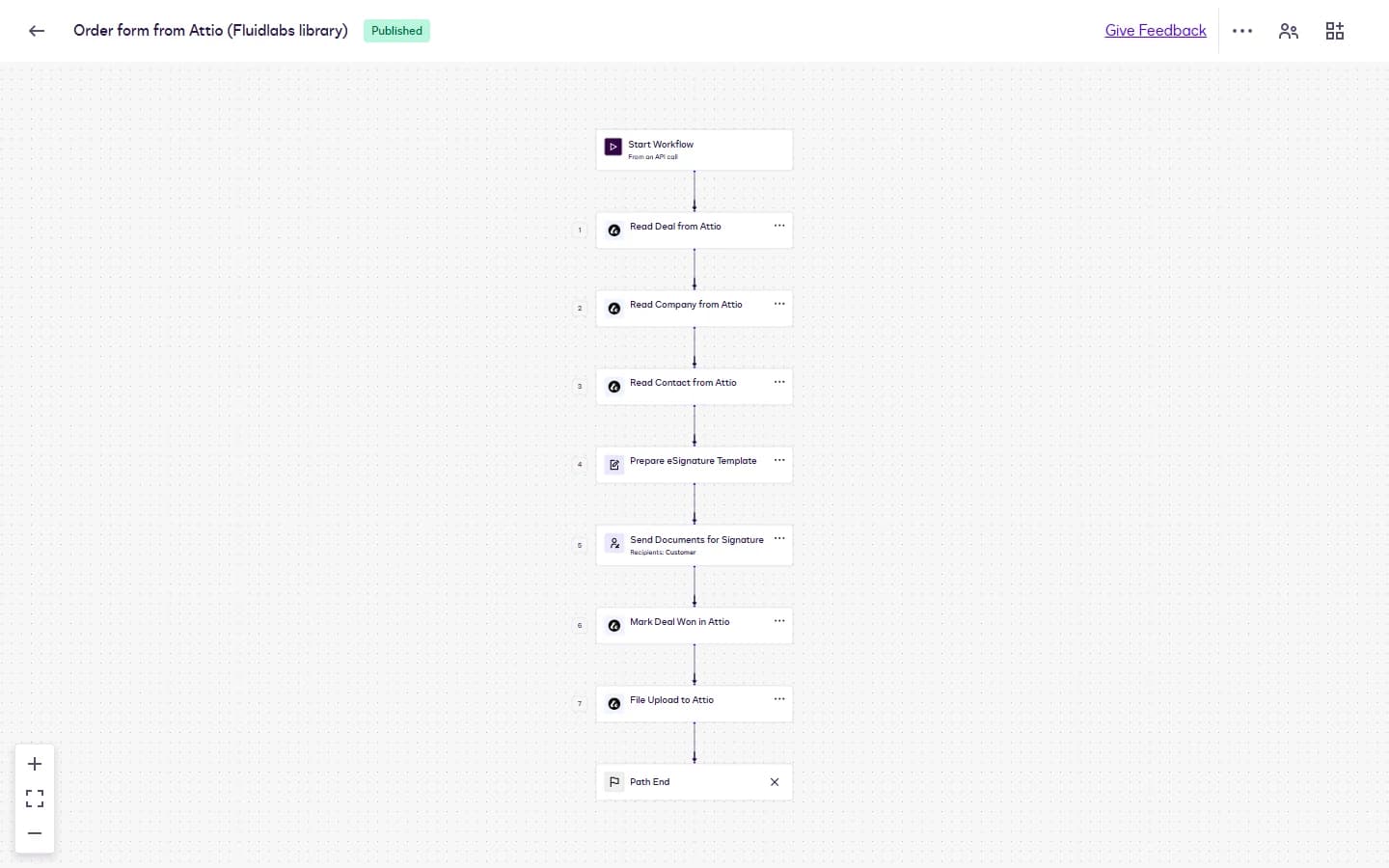
The workflow reads the deal, its company and its contact from Attio, fills the order form, and sends it to the contact for signature. Once the contact signs, it moves the deal to Won and files the signed order form on the deal.
- Starts
- From an API call or by hand
- Steps
- 7
- Document
- Order form, 1 page
- Signers
- The customer contact
- Last test run
- 16 October 2026
What it does
- Start: Start WorkflowFrom an API call, or Run Workflow by hand. Inputs: dealId, serviceStart, term.
- 1Read Deal from AttioDeals where Record ID equals dealId: Record ID, Deal name, Deal value, Associated company, Associated people.
- 2Read Company from AttioCompanies where Record ID equals the deal's Associated company: Name, and Primary location Line 1, Locality, Region and Postcode (the form uses the first three).
- 3Read Contact from AttioPeople where Associated deals equals dealId, one record: Name: Full name, Email addresses.
- 4Prepare eSignature TemplateThe order form template, with its eight data labels mapped.
- 5Send Documents for SignatureTo the customer contact, with the subject "Please sign: your order form".
- 6Mark Deal Won in AttioDeal update: Deal stage becomes "Won 🎉".
- 7File Upload to AttioThe signed order form in the deal's Files, as Signed Order Form.
Field map
| Data label on the order form | Attio field | Step |
|---|---|---|
Customer_Name | Company / Name | 2 |
Customer_Address | Company / Primary location: Line 1, Locality, Region | 2 |
Contact_Name | Person / Name: Full name | 3 |
Contact_Email | Person / Email addresses | 3 |
Order_Reference | Deal / Deal name | 1 |
Order_Total | USD + Deal / Deal value | 1 |
Service_Start | Start input serviceStart | Start |
Term | Start input term | Start |
Written back: Deal stage = Won 🎉
Filed to: Deals / {Deal Record ID} / Signed Order Form
An order form that fills itself
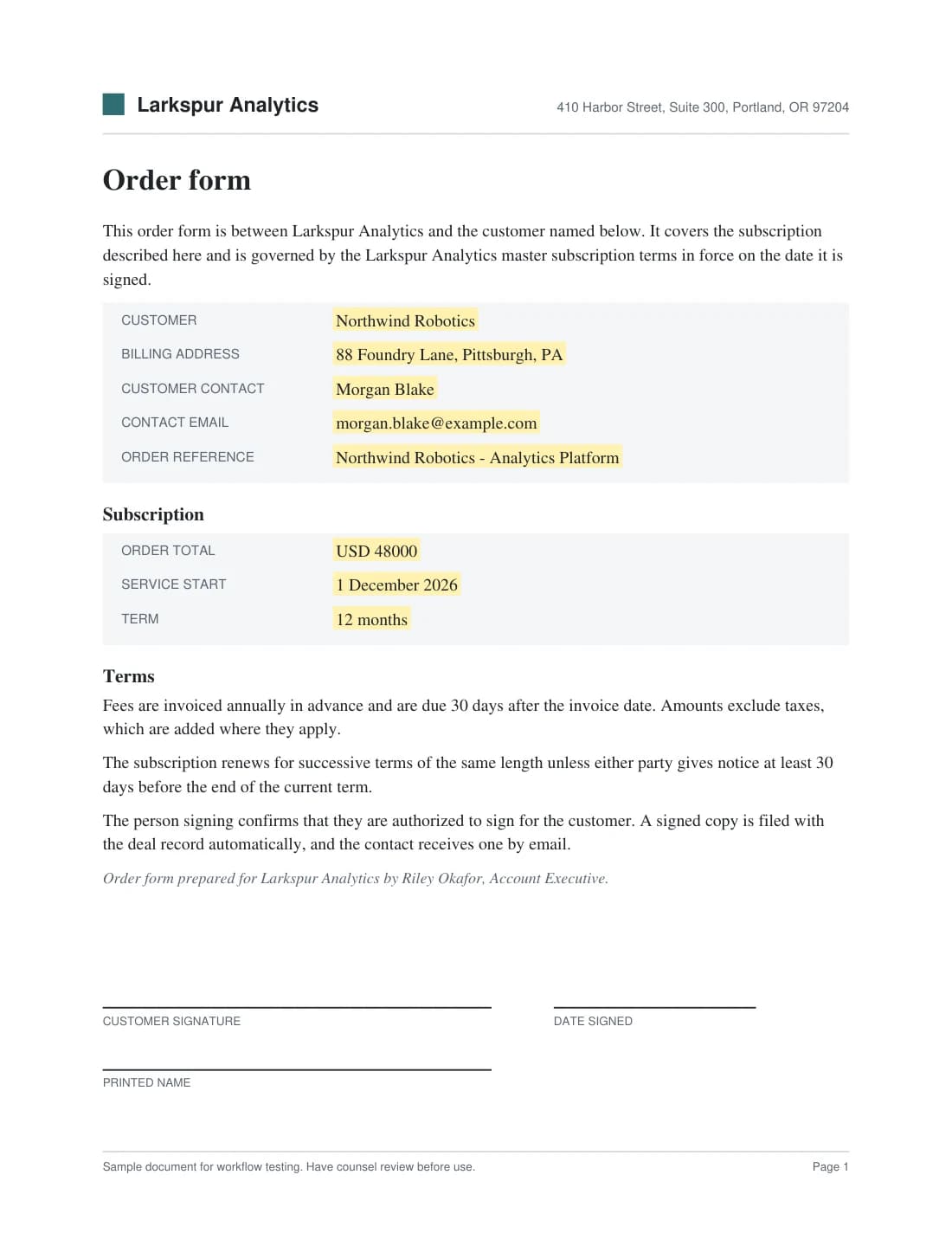
The highlighted fields are the order form's data labels, shown here with sample values. The field map lists where each one comes from in Attio or the start inputs. Each field sits on a hidden anchor tag, so you can use your own order form: keep the eight data labels and the workflow keeps working.
Set it up
Install and connect the app
Install Attio for Docusign IAM from the Docusign App Center and connect it to your Attio account. An account admin does this once.
Import the workflow
In Docusign, go to Agreements, Workflows, Create Workflow, then Import Workflow, and pick the .zip. When it asks, pick your Attio connection.
Review each step
The import creates the order form template in your account and fills the steps. Check the template mapping on Prepare eSignature Template, then publish.
Test with a sample record
Run it once on a test record addressed to your own inbox, and check the write-back and the file.
Make it yours
- Set the deal stage your workspace uses. The Mark Deal Won step writes "Won 🎉", the Attio default, and the stage title must match exactly, emoji included.
- File the signed copy on the company instead of the deal: in File Upload to Attio, choose the Companies drive and use the company's Record ID as the folder.
- Sell in another currency by changing the text USD in the Order_Total mapping on Prepare eSignature Template. Attio returns the deal value as a number only.
- Send more than one order form per deal by adding a variable from Instance details to the file name in File Upload to Attio. Attio keeps one file per name on a record and refuses a second Signed Order Form.
Questions
Can I use my own order form?
Yes. Upload your order form as an eSignature template, place the eight data labels on it, and choose it in the Prepare eSignature Template step, then map the fields again.
The import says an app linked to a workflow step is missing.
Install and connect Attio for Docusign IAM first, then import the .zip again. Docusign does not name the missing app in that message.
Who starts the workflow?
An account executive can run it by hand with the deal's record ID, the service start and the term. Another system can start it through the API with the same three inputs, for example with Baton.
Which contact signs?
The Read Contact from Attio step finds the people whose Associated deals include the deal and uses one of them. Link only the signer to the deal, and give them one email address.
Why is there no postcode in the address?
A template field takes at most three variables. Customer_Address uses Line 1, Locality and Region from the company's primary location.
Need it to match your sales process?
We adapt library workflows to your stages, approvals and documents, and build private apps when a system has no app yet.
Docusign is a trademark of Docusign, Inc. Attio for Docusign IAM is published by Fluidlabs. To ask us to remove a mark, email hello@fluidlabs.com.