Send an order form from a NetSuite quote and file it signed
Fills an order form from the quote, its customer and contact, collects both signatures and files the signed copy on the quote.
- Read
- Read
- Read
- Template
- Send
- File
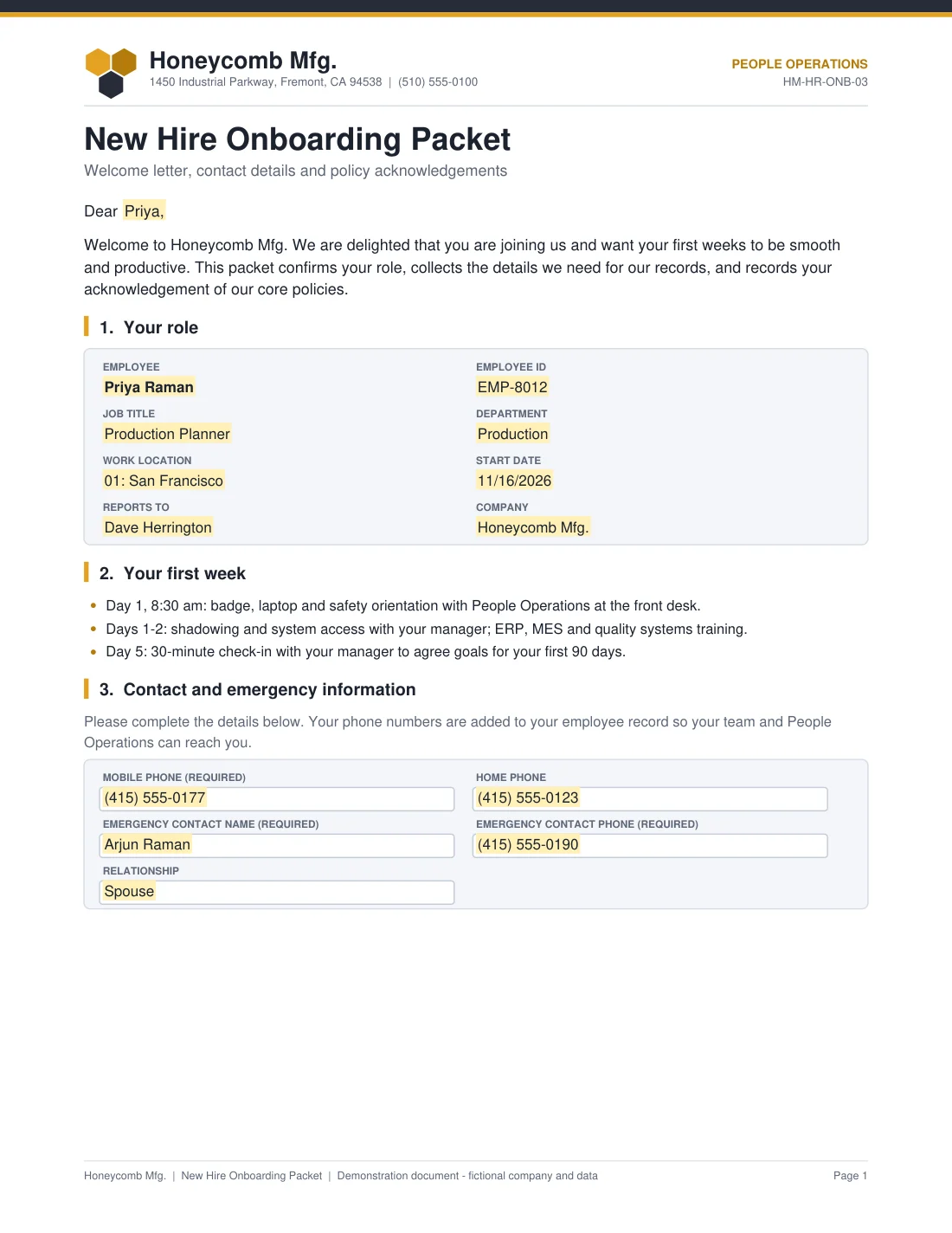
The workflow reads the employee from NetSuite and fills a welcome letter and role summary, which the new hire completes with their phones and an emergency contact, initials against three policies and signs. It then writes the mobile and home phone back to the employee and files the signed packet on the employee record.
| Data label on the new hire packet | NetSuite field | Step |
|---|---|---|
Employee_First_Name | Employee / First Name | 1 |
Employee_Name | Employee / First Name and Last Name | 1 |
Employee_Number | Employee / Record ID | 1 |
Job_Title | Employee / Job Title | 1 |
Department | Employee / Department Name | 1 |
Work_Location | Employee / Location Name | 1 |
Start_Date | Employee / Hire Date | 1 |
Supervisor_Name | Employee / Supervisor Name | 1 |
Subsidiary_Name | Employee / Subsidiary Name | 1 |
Employee_Signer_Title | Employee / Job Title | 1 |
Written back: Mobile Phone = Mobile_Phone, as the new hire entered it; Home Phone = Home_Phone, as the new hire entered it
Filed to: Employee drive / {Employee Record ID} / Signed Onboarding Packet - {Employee ID} - {Instance ID}.pdf

The highlighted fields are the new hire packet's data labels, shown here with sample values. The field map lists where each one comes from in NetSuite or the start inputs. Each field sits on a hidden anchor tag, so you can use your own new hire packet: keep the ten data labels and the workflow keeps working.
Install NetSuite for Docusign IAM from the Docusign App Center and connect it to your NetSuite account. An account admin does this once.
In Docusign, upload the new hire packet template (.json) under Templates. It carries the document and its fields.
In Agreements, Workflows, Create Workflow, add the steps listed above in order. Use the definition file to check the settings of each step, pick your NetSuite connection, and map the fields as the field map shows.
Run it once on a test record addressed to your own inbox, and check the write-back and the file.
No. It is the definition exported from the tested workflow, kept as a reference. Build the workflow step by step in Docusign Workflow Builder and use the file to check the settings of each step. The account, connection and template ids in it are placeholders.
HR, on the NetSuite employee with Baton Launcher, or anyone with Run Workflow and the employee's internal ID. Another system can start it through the API with Employee_ID.
Mobile Phone and Home Phone on the employee record, with the numbers the new hire typed. The emergency contact stays on the signed packet unless you map it to fields of your own.
No. Honeycomb Mfg. is a fictional company and every sample value is invented. Put your own company, terms and template in place before you use the workflow.
We adapt library workflows to your stages, approvals and documents, and build private apps when a system has no app yet.
Fills an order form from the quote, its customer and contact, collects both signatures and files the signed copy on the quote.
Fills a credit application from the customer record, collects the customer and credit manager signatures and updates the customer.
Fills a supplier agreement from the vendor, collects the legal name, tax ID and both signatures, and updates the vendor.
Docusign is a trademark of Docusign, Inc. NetSuite for Docusign IAM is published by Fluidlabs. To ask us to remove a mark, email hello@fluidlabs.com.